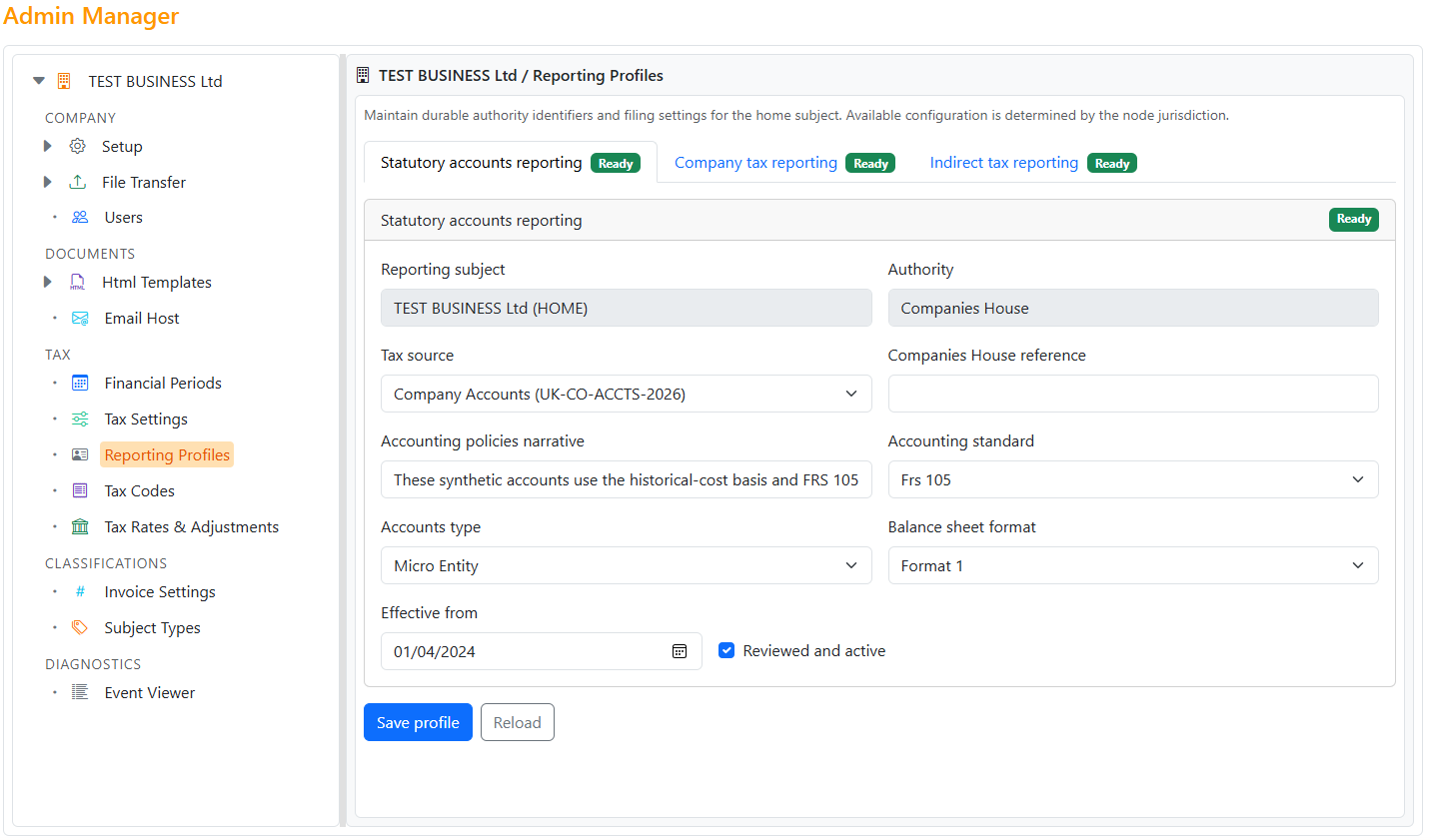
Tax Hub relies on a correctly initialized business and reviewed statutory reporting profiles. An administrator should complete this work before reporting periods are reviewed.
In System > Admin Manager > Setup, select the jurisdiction, business template, financial-year start and VAT registration status. See Node Initialisation for the complete setup workflow.
The template determines whether the business is a company or sole trader and installs the corresponding accounting classification. Reporting definitions are jurisdiction- and authority-aware; the design is not limited to one permanent set of UK authorities.
For a sole trader, enter Expected Annual Profit. Trade Control uses it to derive an effective Income Tax and National Insurance planning rate for cash-flow forecasting. It is not a submitted liability and is not an HMRC calculation.
Open System > Admin Manager > Tax > Reporting Profiles. Check the authority reference, required registrations, Tax Source and reporting settings for every applicable profile. Select Reviewed and active only after completing that review.
See Reporting Profiles for the profile states and maintenance workflow.
Use Financial Periods to confirm the accounting calendar. Companies should also check the Corporation Tax rate for each financial period in Tax Configuration. Use an adjustment for an historical difference rather than silently rewriting the recorded rate.