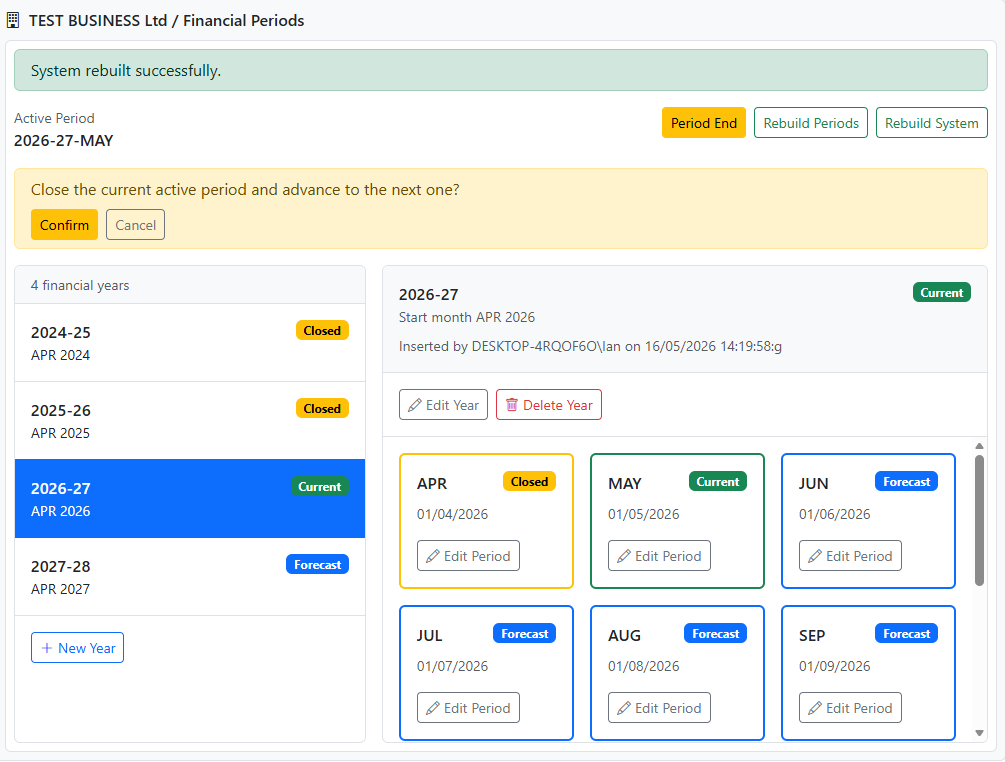
The Financial Periods module is where you define your accounting calendar and control how Trade Control closes each month.
Financial Periods provide the “time structure” needed to measure business performance over defined accounting periods. They do not structure the data, since Trade Control stores transactions as atomic postings.
A business system could operate without period ends. However, in most societies, period-based accounting is not optional in practice. It is central to how owners, lenders, auditors, and governments evaluate a business.
Period ends are vitally important for:
Owners typically extract value from a business based on performance over an accounting period.
Period ends support:
Corporation Tax is calculated on profits earned over the business’s accounting year.
A clear financial year structure and stable period closes help ensure:
VAT is typically assessed over quarterly periods.
Financial periods provide the date boundaries required to reliably determine:
Open:
On desktop, Financial Periods opens in the right-hand pane. On mobile it opens as a full page.
A financial year defines the official 12‑month reporting cycle for the business.
This is the year used to produce annual accounts and corporate tax reporting.
Each year is split into monthly periods.
A monthly period has a start date. It does not have to be the 1st.
This lets you align period boundaries to real operational close-down schedules (for example, after stock take or other month-end routines).
The Index page shows:
Use Period End to close the current Active period and advance to the next month.
Why this exists:
Expected outcome:
Use Rebuild Periods if historic transactions have been changed in a period that has already been closed and you want reporting totals to reflect those changes.
This is the explicit “accept the change into closed reporting” action.
Expected outcome:
Use Rebuild System only when you suspect the system’s period/reporting state is inconsistent or corrupted.
Expected outcome:
Use this workflow to align Trade Control period boundaries to your business month-end routines.
If an action fails, the page provides a link to Event Logs.
From Admin Manager on desktop, Event Logs opens outside the embedded pane and includes a Back button to return to Admin Manager with Financial Periods selected.