
Use the Transfers workspace to plan and manage transfers between cash accounts.
In Cash Manager, transfers are handled as planned transfer accruals first, then committed into account history when posted.
Use transfers to:
Transfers are part of the normal cash workflow, not a separate module.
Transfer accruals are unposted transfer payment entries.
They are useful when a business wants to plan cash movement before committing it.
For example, a company may plan to move money from its current account into a reserve account. The transfer can be entered first as planned activity, then posted later.
This matters because planned transfers affect cash flow in the company statement.
That forward-looking behaviour is part of the cash-flow view represented by the statement model.
Transfers are intended for Cash accounts.
If the selected account type does not support transfers, the Transfers workspace will not be shown.
A typical planned transfer includes:
Cash Manager creates the paired planned transfer entries from the selected source account.
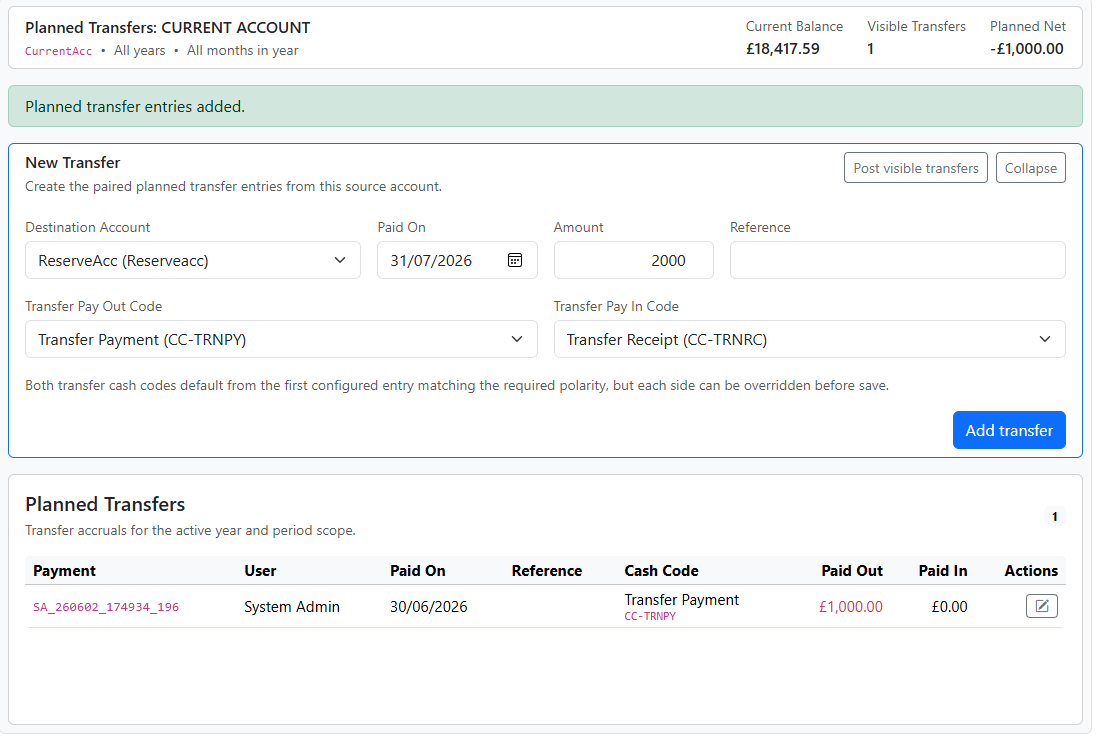
The Transfers workspace includes a posting action for the visible planned transfers.
Use this when you are ready to commit the current planned transfer accruals into the posted account history.
In day-to-day use, this is a lightweight spool action rather than a major end-of-period process.
After entering or posting a transfer, return to the Statement to confirm:
This usually means the selected account type does not support transfers.
Check:
Check whether the transfer is still a planned accrual and has not yet been posted.


