
Use the Payments workspace to add and manage payments for the selected cash account.
This is the main entry workspace for ordinary payment activity in Cash Manager.
Use it to:
Cash Manager keeps payment entry and payment review together so that you can see what is already in the spool while adding more activity.
In most cases, the Payments workspace is where users start.
A typical payment entry includes:
The organisation is selected through the namespace-aware Subject selector, so the payment is entered in the correct business context.
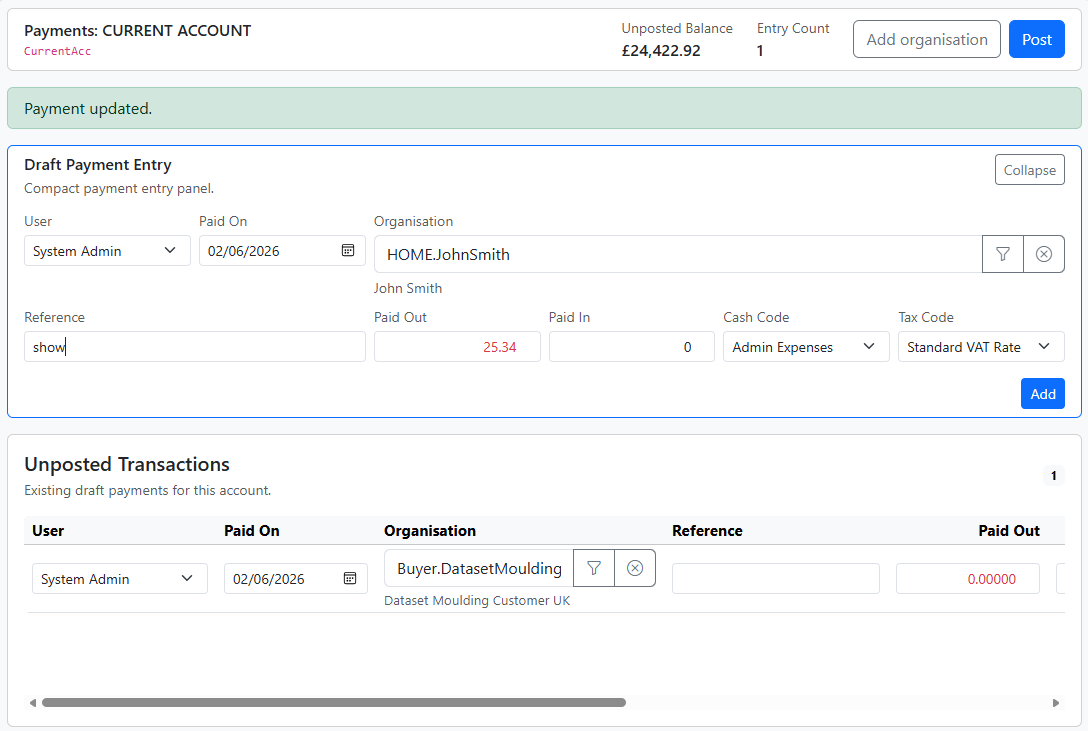
Payments are namespace-aware.
That means the payment is not just linked to a Subject. It is also linked to the namespace context in which that Subject was used.
This matters when the same organisation appears in more than one namespace.
The namespace selector helps make sure the payment is attached to the correct path.
The Payments workspace also shows the current unposted transactions for the selected account.
This helps you:
Although Payments is mainly an entry workspace, it also supports review of the current draft list.
This means you can:
More extensive correction of posted payments is usually done from the Statement workspace.
A good pattern is:
Check the namespace path first. The same organisation may exist in more than one namespace context.
This usually means a cash code has not yet been selected.
Check:


