Subject Browser - Getting Around
Subject Browser is designed to stay usable whether your structure is small or very large.
The main parts of the page
Subject Browser has four main parts:
- the namespace filter
- the mode selector
- the Subject tree
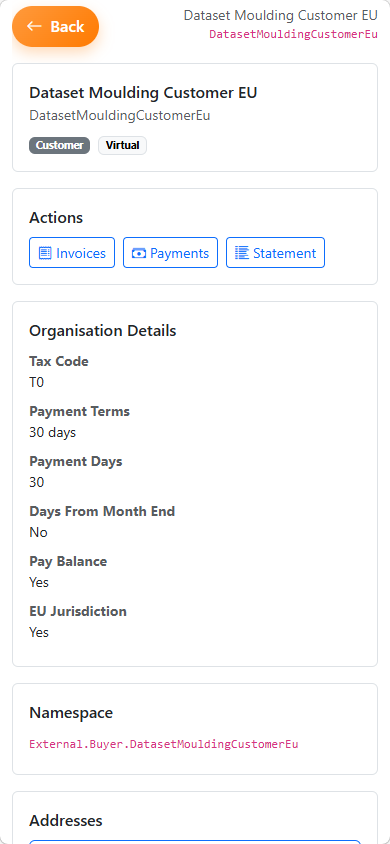
- the details pane or mobile details view
Namespace filter
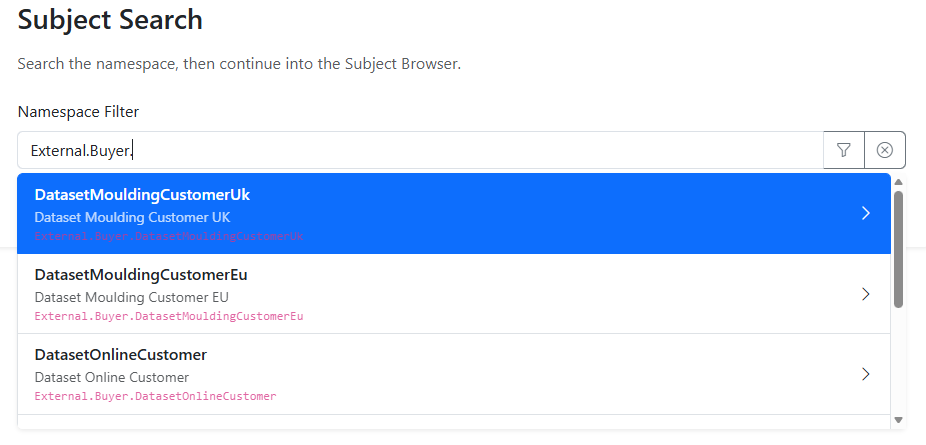
The namespace filter helps you narrow the visible structure before you expand the tree.
You can use it to:
- search by namespace path
- search by Subject code
- search by display name
- move quickly into a branch of the structure
If you type a path ending with ., the selector treats that as a namespace context and suggests immediate child segments.
This makes it easier to move through large structures without expanding everything manually.
Tree behaviour
The tree is loaded lazily.
That means:
- root Subjects load first
- child Subjects load only when a branch is expanded
- large child sets may show
Load more…
This keeps the browser responsive when the namespace is large.
Selecting a Subject
When you select a Subject:
- the tree highlights the selected node
- the details pane updates on desktop
- the mobile action bar updates on mobile
- the selected namespace path becomes the active working context
Multiple namespace appearances
Because the Subject model is a DAG, the same Subject can appear in more than one place.
This means:
- you may see the same Subject under different paths
- each appearance represents a different namespace instance
- selecting one instance does not automatically expand the others
Desktop navigation
On desktop:
- use the tree on the left to browse
- use the details pane on the right to inspect and act
- use the splitter to adjust tree and details width
Mobile navigation
On mobile:
- browse the tree in the main view
- use the bottom action bar for quick actions
- tap
Details to open the selected Subject in full-page detail mode
- use the
Back button to return to the previously selected node
Common outcomes
No Subjects found
If the current filter matches nothing, the tree shows No Subjects found.
Clear or broaden the filter to restore the wider structure.
No children visible
A node may have no children, or the current filter may exclude them.
Filter changes the current context
Applying a new namespace filter refreshes the current selection and visible roots.
Related pages