Admin Manager - Users
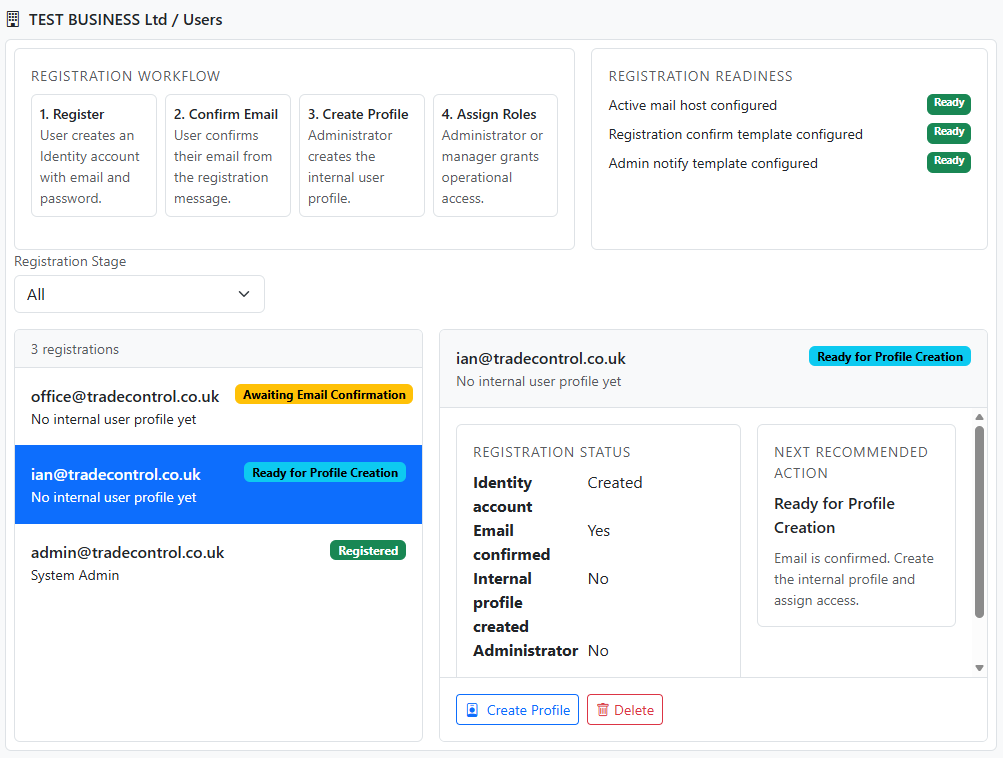
Users is where Administrators process registration requests and manage access.
Use it to:
- create internal user records for confirmed registrants
- assign roles such as Administrator and Manager
- delete registrations or users safely
Access
Open:
- System > Admin Manager
- select Users
On desktop, Users opens in the right-hand pane. On mobile, it opens as a full-screen view.
What the module shows
The Users area combines:
- a registration workflow summary
- readiness checks for registration email dependencies
- a stage filter for registrations
- the working list of users and registrations
Understand the user states
The list uses two important flags:
- Confirmed: the user confirmed their email address
- Registered: the internal Trade Control profile exists
These states are explained in:
Process a new registration
The normal flow is:
- find a user with confirmed email
- select Create
- enter the internal profile details
- save the profile
Expected outcome:
- the
Usr.tbUser record is created
- the user becomes registered
- role assignment can proceed
Assign roles
- Locate the registered user
- select Roles
- assign the required roles
- save the changes
Delete a registration or user
Delete is intended for:
- mistaken registrations
- access removal
- test-data cleanup
- Select Delete
- review the confirmation
- confirm deletion
Notes
- on mobile, Back returns to the previous Manager node
- if a deletion fails because of references, inspect Event Viewer for details