Category Tree — User Guide
A practical, user‑focused guide to configuring Trade Control’s Category Tree. It explains why this matters, what the key concepts are, and how to set things up quickly and safely.
Index
Why: A better foundation than ledgers and nominal codes
Trade Control replaces traditional accounting ledgers and nominal codes with a recursive classification system. Instead of forcing transactions into a fixed chart, you define Categories that reflect how your business truly operates. This is important because:
- Cash polarity drives meaning: positive quantity pairs with negative cash (and vice versa), so direction and ownership are implicit.
- Totals and statements (Profit/VAT) come from your Category hierarchy, not from manual ledger postings.
- You gain transparent, composable structure: Categories can contain Cash Codes or other Categories, enabling flexible roll‑ups, drill‑downs, and automation.
In short, configure Categories to tell the system “how your business works,” then Trade Control calculates “what it means” (profit, tax, balances) without you juggling ledgers.
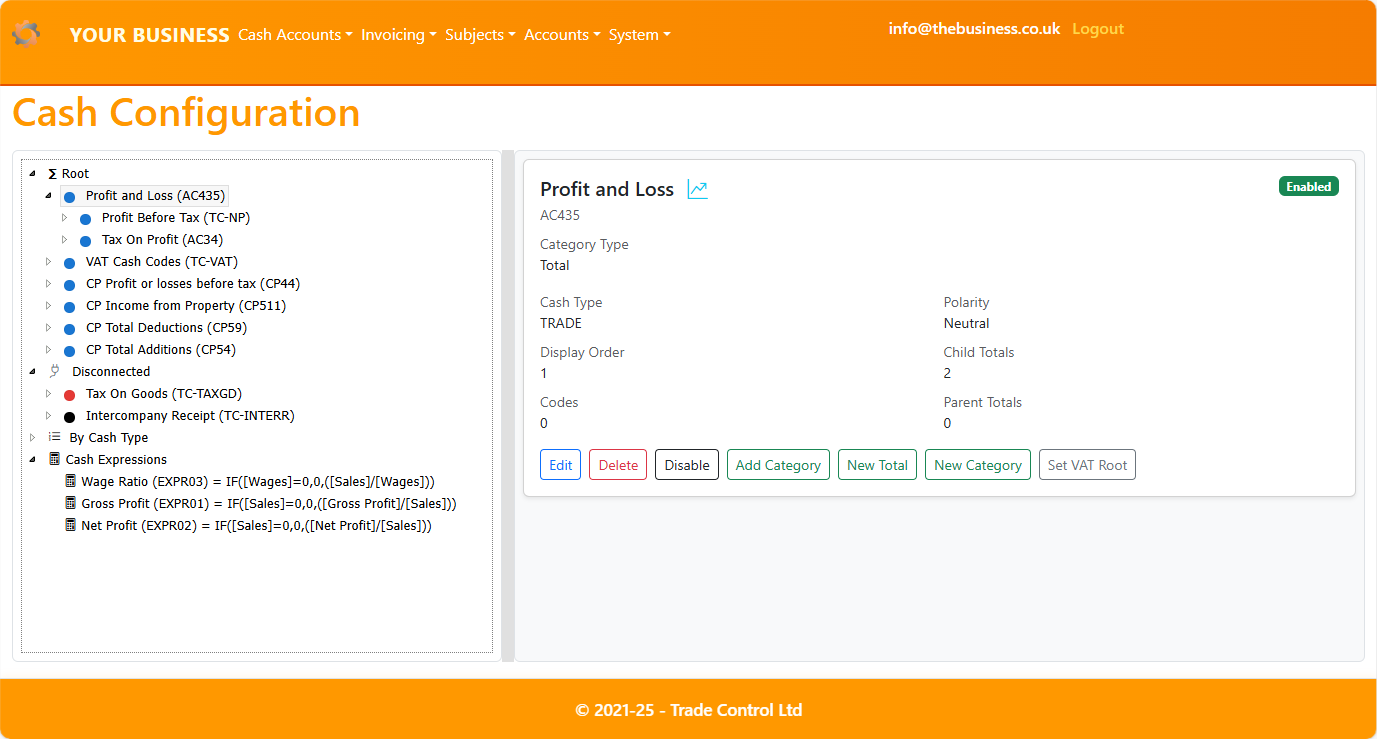
Screenshot:
What: Categories, Cash Codes, Totals, Expressions
-
Categories
- Sets that organize your business. They can contain Cash Codes (leaves) or other Categories (folders).
- Two main kinds:
- Cash Code Category: holds Cash Codes of the same type and polarity.
- Total: a roll‑up category used to aggregate subcategories (e.g., Sales, Direct Costs, Indirect Costs).
-
Cash Codes
- Describe transactions: type (TRADE/MONEY/EXTERNAL), tax type/rates (VAT, income tax, general), and cash polarity.
- Appear as leaf nodes under a Cash Code Category.
-
Totals
- Roll‑ups used for statements and analytics (e.g., Gross Profit, Net Profit, VAT).
- Built by composing categories recursively.
-
Expressions
- Derived metrics defined with Excel‑style formulas using Category names, e.g.:
IF([Sales]=0,0,([Gross Profit]/[Sales])) with format 0%
- Managed under an Expressions root. They don’t change hierarchy; they compute values for reporting.
Background: Classifying Cash Transactions
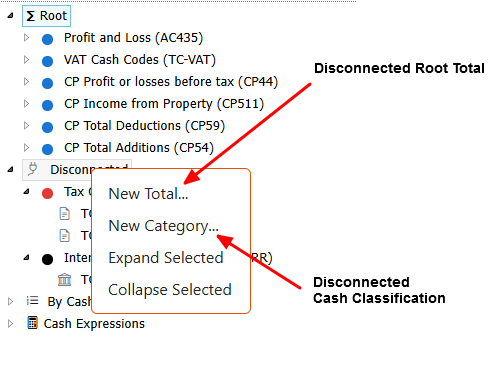
- Review Disconnected items
- Open “Disconnected” to find categories not yet part of your main hierarchy.
- Decide where each belongs (e.g., under Sales, Direct Costs, Indirect Costs).
- Attach existing categories or create new ones as needed.
Screenshot:
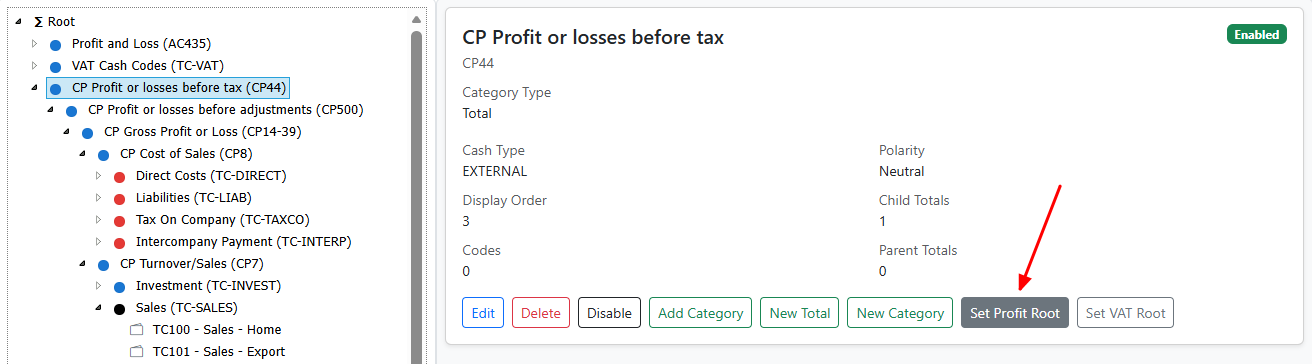
- Establish primary Totals at Root
- Under “Root”, create or align Totals, for example:
- Sales (positive polarity)
- Direct Costs (negative polarity)
- Indirect Costs (negative polarity)
- When ready, set “Profit Root” and “VAT Root” to anchor statements.
Screenshot:
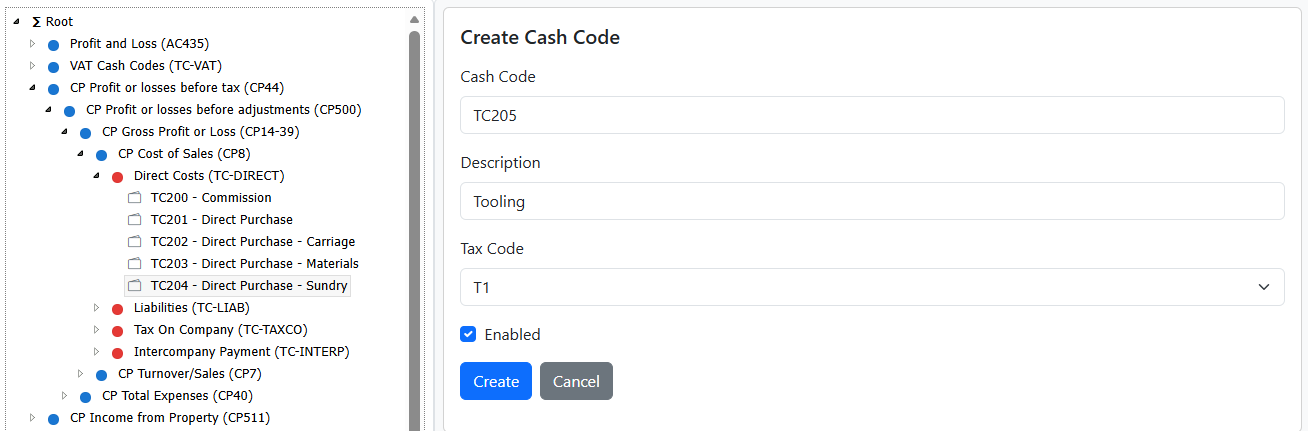
- Attach Cash Codes under Categories
- Under each Cash Code Category, add existing Cash Codes or create new ones.
- Use “New Cash Code like this…” to prefill sensible defaults from a similar code (helps consistency for tax/polarity).
Screenshot:
- Organize and tidy
- Reorder sibling categories for clarity and Cash Statements (by Type view or within Totals). Use Drag/drop or SHIFT+UP/DOWN.
- Keep names clear and short; use consistent naming for Sales/Costs groups.
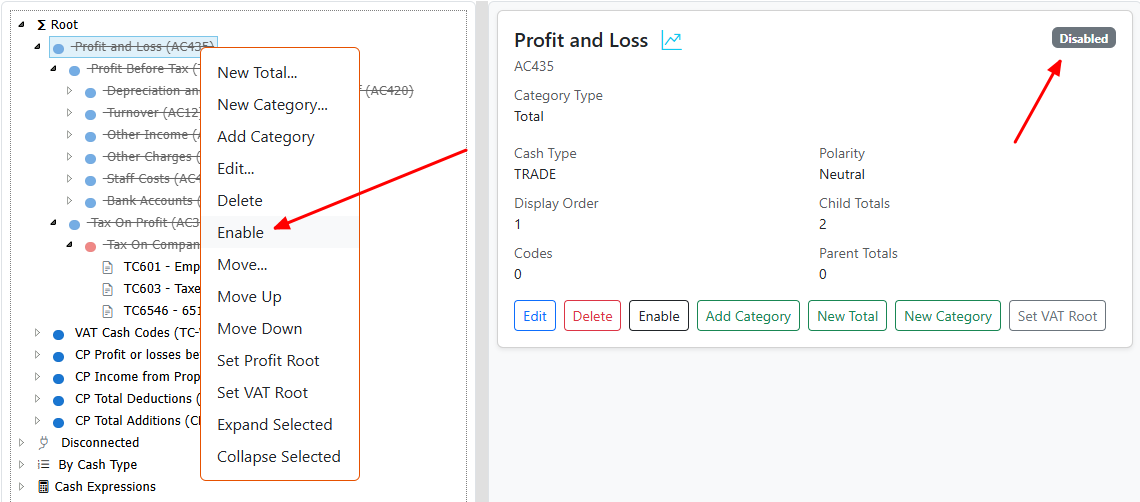
- Disable item hierarchies you’re not ready to use (they stay configured but excluded from calculations). Note that Category enable/disable is recursive but does not include Cash Codes.
Screenshot:
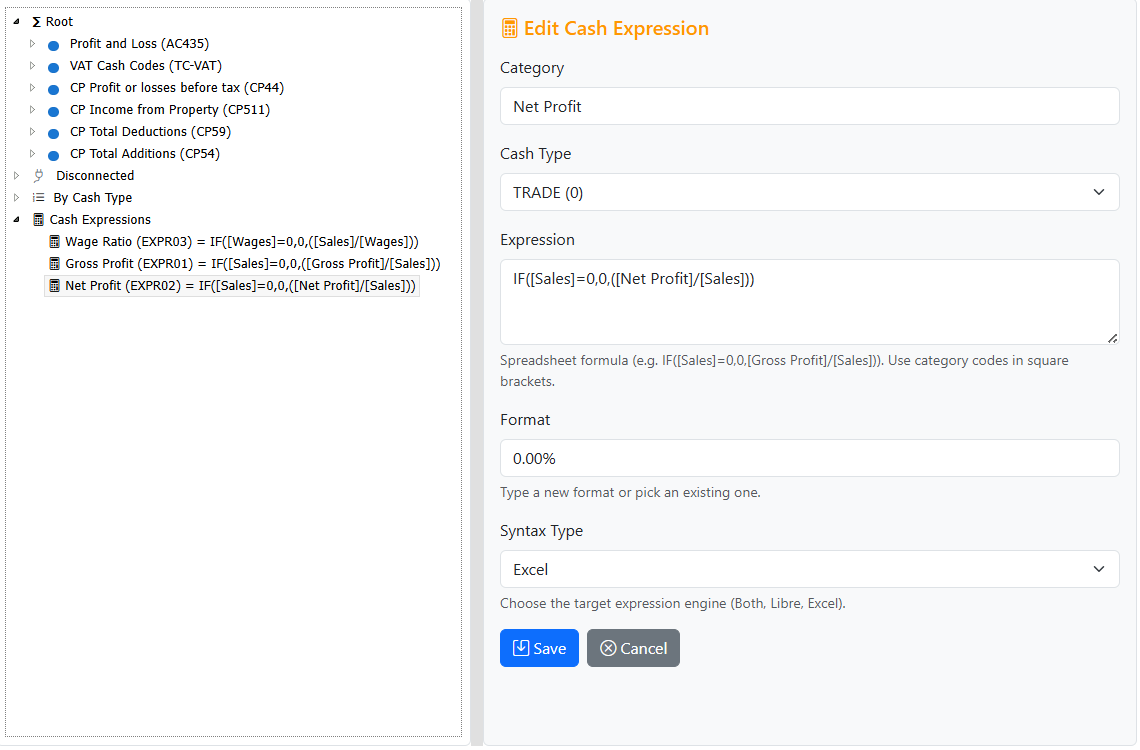
- Add Expressions for key ratios
- In the Expressions root, define metrics such as Gross Profit %.
- Choose Syntax Type (Both/Libre/Excel) to match your export/reporting target.
- Apply display formats (
0%, currency) for readability.
Screenshot:
- Validate with a quick verification check
- Ensure Sales totals carry positive values; Costs totals carry negatives.
- Confirm VAT root includes sales and excludes salaries/other non‑VAT costs.
- Spot‑check a few Cash Codes for correct tax type and polarity.
- Profit statements and VAT returns computed directly from your hierarchy (no manual ledger runs).
- Instant integrity: cash polarity and totals roll‑ups provide transaction‑level confidence.
- Clear navigation and maintenance: categories reflect business reality and can evolve without reworking ledgers.
- Readiness for automation and analytics: your structured hierarchy and expressions are machine‑friendly.
Tips: Iteration, safety, and consistency
- Start small: configure core Totals (Sales, Direct, Indirect) before adding niche categories.
- Prefer disabling to deleting: disable items while you refine your structure.
- Be consistent: name categories and codes clearly; group by business function and polarity.
- Use Type view for maintenance: reorder within Cash Types to keep browsing logical.
- Keep expressions simple: begin with 2–3 metrics your team understands (e.g., Gross Profit %, Contribution Margin).
Glossary: Quick reference
- Category: A folder that can contain Cash Codes or Categories.
- Cash Code Category: A folder for Cash Codes of the same type/polarity.
- Total: A roll‑up Category used for statements (e.g., Sales, Direct Costs).
- Cash Code: A leaf that describes a transaction’s domain, tax type, and polarity.
- Expression: A derived metric defined by an Excel‑style formula under the Expressions root.
- Disconnected: A synthetic subtree showing categories not yet mapped.
- Root: The main hierarchy anchor. Set Profit/VAT roots here.
- Polarity: Direction of cash vs quantity (incoming/outgoing/neutral). Drives meaning across transactions.