Category Tree Technical Guide
Index
1. High-level structure
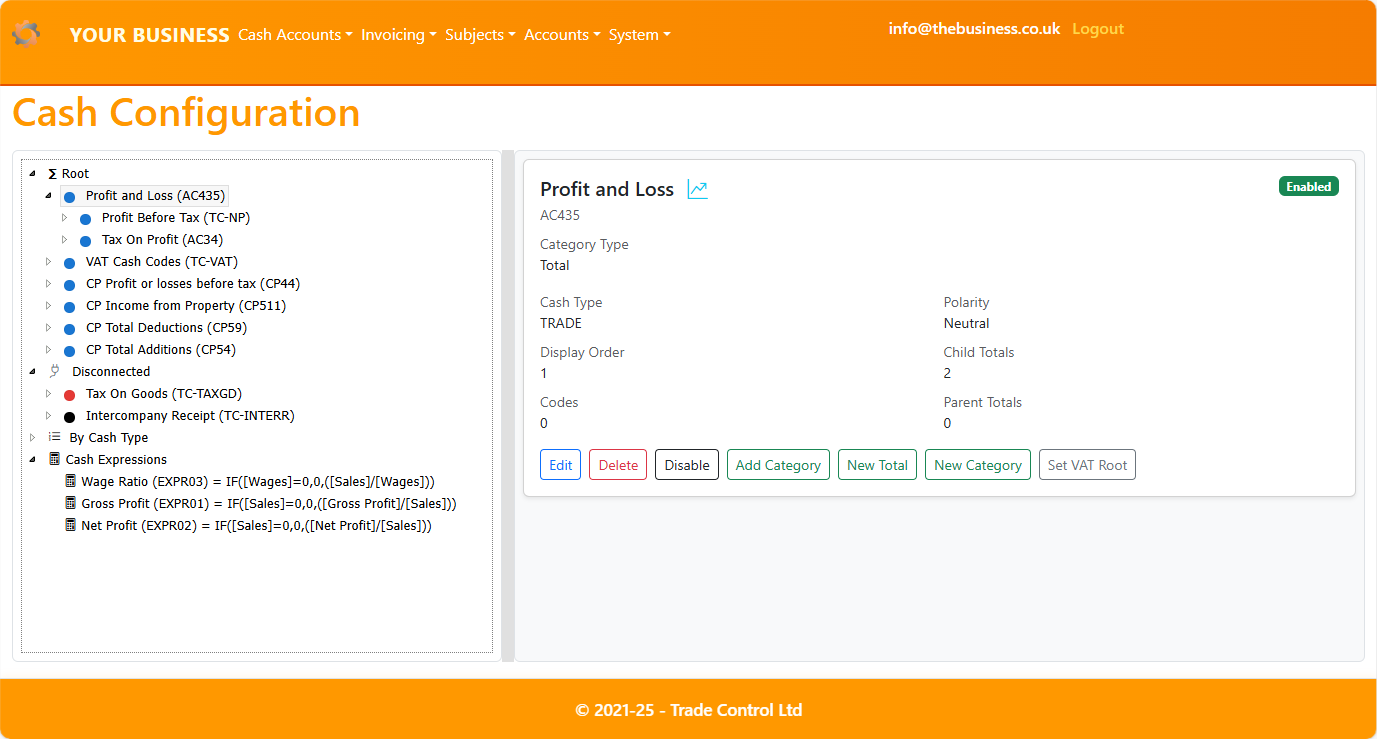
The Category Tree provides an interactive view over Cash Categories, Cash Codes, and Expressions. It is optimized for Razor Pages with desktop and mobile layouts.
- Desktop layout:
- Left pane: tree navigation and actions (drag/drop, keyboard, context menu).
- Right pane: details and edit forms (embedded; uses partial layout).
- Screenshot placeholder:
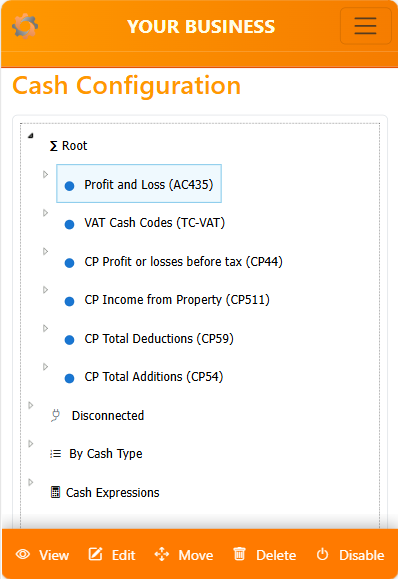
- Mobile layout:
- Single pane with the tree and a dynamic action bar.
- Navigation to details uses full page (no embedded pane).
- Screenshot placeholder:
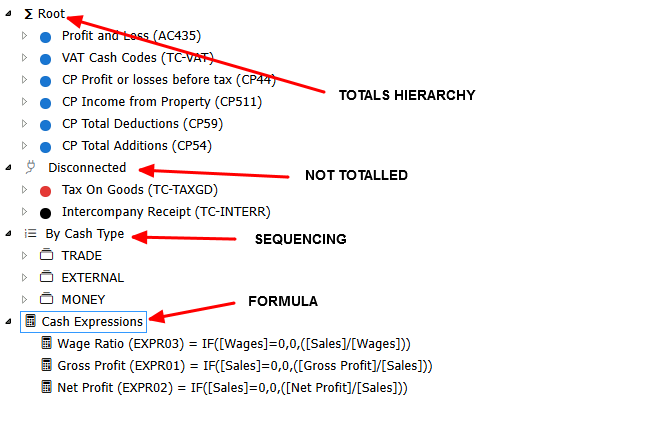
Node types you will see:
- “Root” — the primary hierarchy anchor (synthetic node).
- “Disconnected” — categories that are not part of any mapping (synthetic node).
- “Types root” — grouping by Cash Type (synthetic node).
- “Type node” — synthetic container representing a Cash Type (e.g.,
type:TRADE).
- “Category”
- Cash Code Category (folder; CategoryType: CashCodeCategory).
- Total (folder; CategoryType: CashTotal).
- “Cash Code leaf” — terminal node representing a Cash Code (not a folder).
- “Expression root” — synthetic anchor for expressions (
__EXPRESSIONS__).
- “Expression leaf” — terminal node representing an expression (not a folder).
- “Synthetic nodes” — special anchors like
__ROOT__, __DISCONNECTED__, type:<code>, __EXPRESSIONS__.
2. Enumerations and constants
Key enums and special keys used throughout the UI and server handlers:
-
Category types (NodeEnum.CategoryType):
- CashCodeCategory (0)
- CashTotal (1)
- Expression (treated separately; leaves under
__EXPRESSIONS__)
-
Expression syntax types (NodeEnum.SyntaxType):
- Both — compatible formatting for LibreOffice and Excel
- Libre — LibreOffice Calc-oriented
- Excel — Microsoft Excel-oriented
-
Special keys used in URLs and node IDs:
__ROOT__ — Root__DISCONNECTED__ — Disconnected__EXPRESSIONS__ — Expressions roottype:<code> — Cash Type container (synthetic)expr:<CategoryCode> — Expression leafcode:<CashCode> — Cash Code leaf
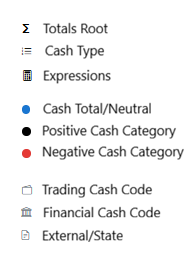
Screenshot placeholders for annotated node types:
3. Permissions and roles
Most interactions are available read-only; mutations require admin privileges.
- Role constant:
Constants.AdministratorsRole
- Admin-only actions:
- Create, edit, delete (categories, totals, cash codes, expressions)
- Toggle enabled/disabled
- Set Profit Root / Set VAT Root
- Reorder operations (drag/drop and keyboard)
- Move categories (child drops into totals; sibling ordering)
- Read-only actions:
- Navigate, expand/collapse, view details
- Keyboard navigation (Left/Right, Home/End)
- Mobile view button
UI gating:
- Buttons and menu items labeled with “admin-only” are hidden unless the user is in
AdministratorsRole.
- Server-side validation always checks privileges, returning JSON errors like “Insufficient privileges”.
4. Navigation and selection mechanics
The page supports deep-linking and smart selection via query parameters, plus an embedded mode for desktop.
5. Create/Edit flows
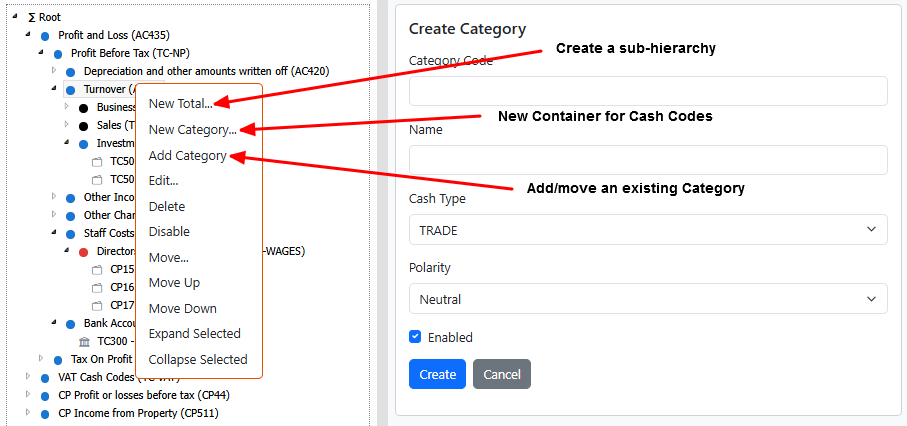
Create and edit operations use Razor Pages. On desktop they load embedded into the right pane; on mobile they navigate to full pages. The UI adapts the available actions based on the selected node type and admin role.
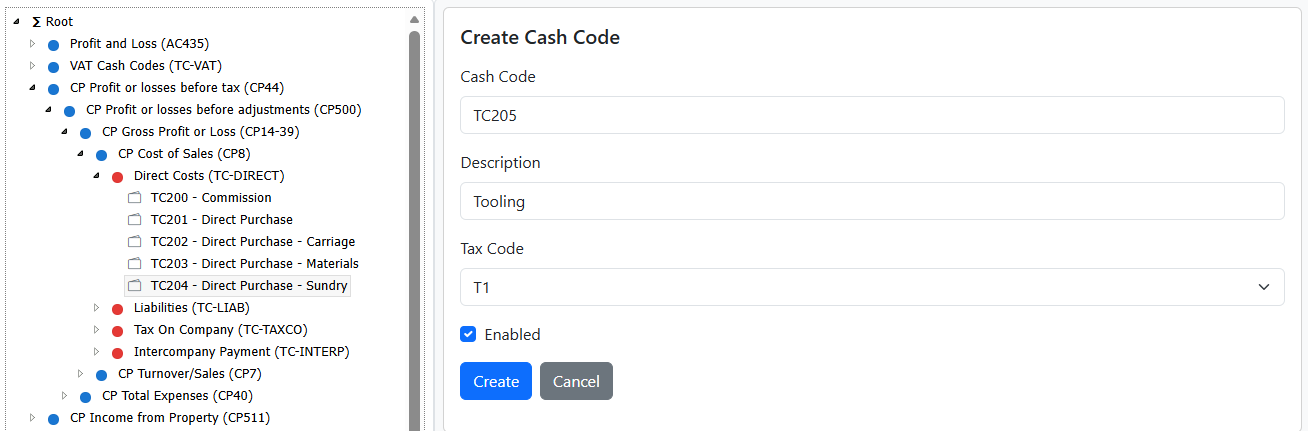
- Cash Code create
- From a Cash Code node: “New Cash Code like this…” pre-fills defaults using the selected code as a sibling template (title formatting and polarity/tax defaults).
- From a Category (Cash Code Category): “New Cash Code” creates a leaf under that category.
- Post-create selection:
- Desktop: the details pane returns a
tcEmbedResult marker to select and focus the new code:<CashCode> under the correct parent.
- Mobile: redirected to the details page of the new code.
- Screenshot:
- Total vs Category create/edit
- Total (CategoryType: CashTotal) creates a folder that can contain Categories or other Totals.
- Cash Code Category (CategoryType: CashCodeCategory) creates a folder that can contain Cash Codes.
- Edit actions route to
EditTotal, EditCategory, or EditCashCode based on node type.
- Screenshot:
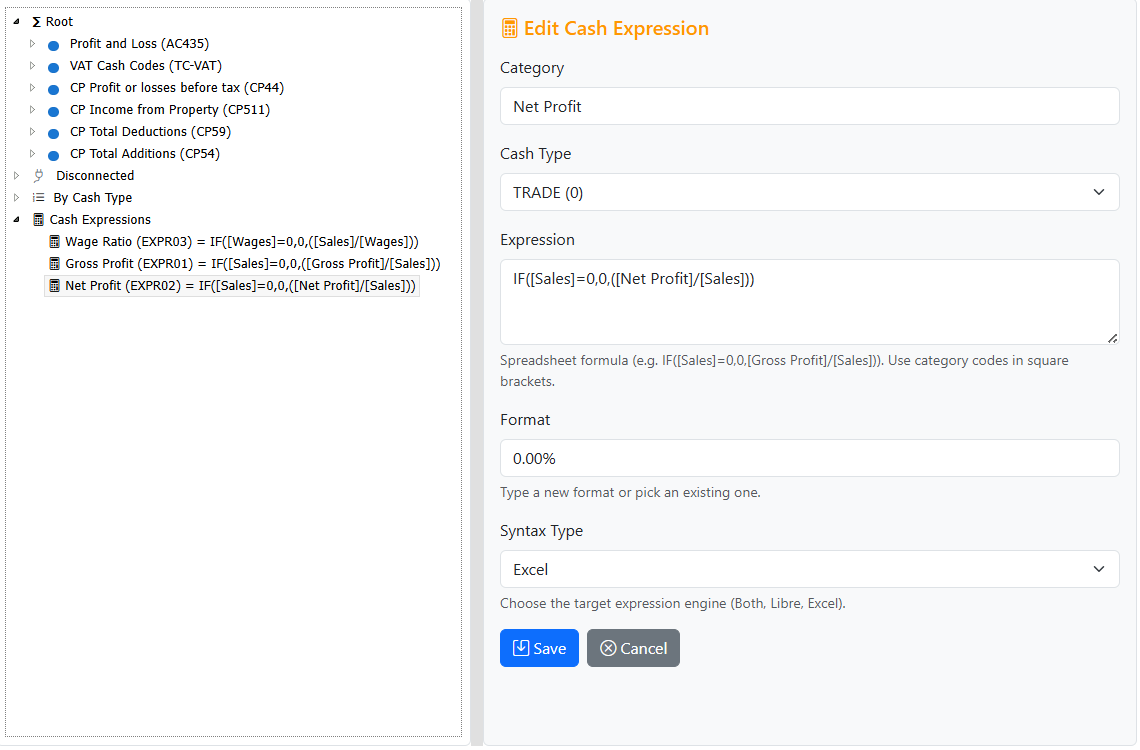
- Expression create/edit
- Expressions appear under the
__EXPRESSIONS__ root and do not participate in category hierarchies.
- Create/Edit includes fields for expression text, display format, and a Syntax Type dropdown:
- Syntax Type: Both | Libre | Excel (target export engine).
- Post-create selection:
- Desktop: injected immediately under
__EXPRESSIONS__ and selected via tcEmbedResult.
- Mobile: redirected to the expression’s view page.
- Screenshot:
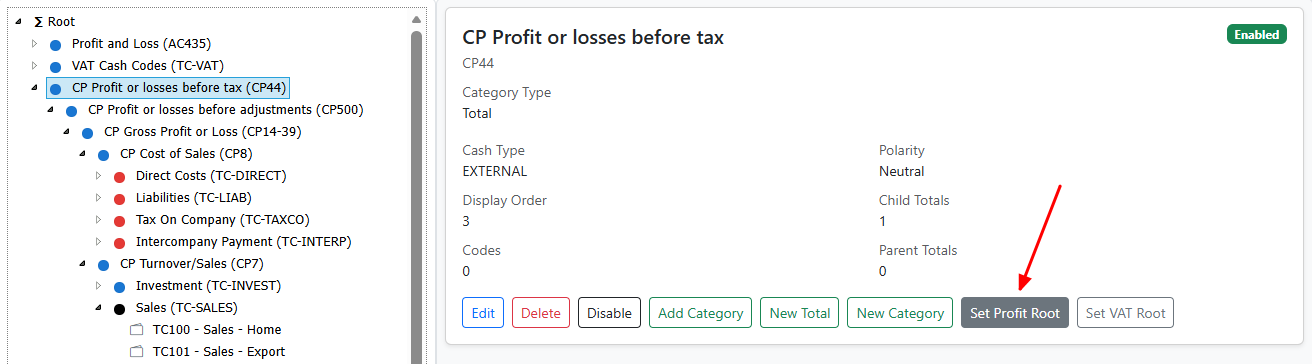
- Root setting (Set Profit Root / Set VAT Root)
- Available for Total categories at the
__ROOT__ level.
- Admin-only actions set the primary root that drives profit and VAT statements.
- Selection persistence:
- The current selection is maintained; the right pane refreshes and icons update.
- Screenshot:
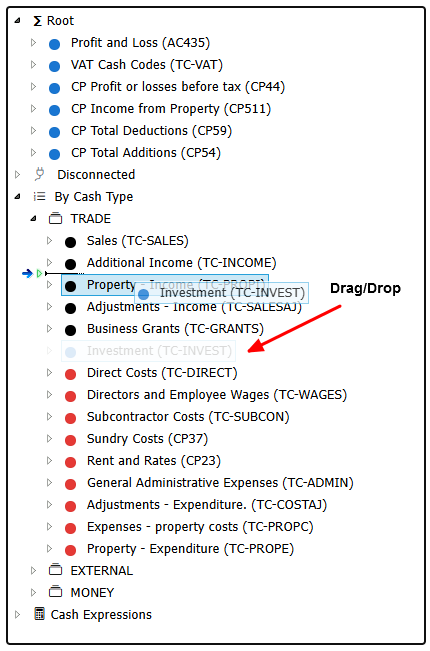
6. Reorder mechanics
Reordering is contextual. All reorders are admin-only and persist server-side through Razor Page handlers.
-
Drag/drop
- Types view: reorder sibling categories within a Cash Type (server handler:
ReorderType).
- Totals/Disconnected: reorder sibling categories under regular parents (server handler:
ReorderSiblings).
- Expressions: flat list under
__EXPRESSIONS__, reorder only among expressions (server handler: ReorderExpression).
- Disallowed: dropping categories under non-Total categories; moving an item under itself or a descendant.
-
Keyboard shortcuts
- Shift+Up/Down: reorder before/after previous/next sibling and persist to server.
- Left/Right: collapse/expand selected folder.
- Home/End: jump to first/last sibling.
- Accessibility:
- Announcements via
aria-live on successful reorder.
- Focus preserved; details pane refreshes on desktop.
-
Handlers
ReorderType(key, anchorKey, mode): sibling ordering within a type:<code> container.ReorderSiblings(parentKey, key, anchorKey, mode): sibling ordering in non-type contexts (Root/regular parents/Disconnected).ReorderExpression(key, anchorKey, mode): expression sibling ordering under __EXPRESSIONS__.
-
Normalization
- A maintenance action exists:
UpgradeTypeOrdering normalizes DisplayOrder per Cash Type (compacts to 1..N; leaves zeros as uninitialized).
- Screenshot:
7. Enable/Disable
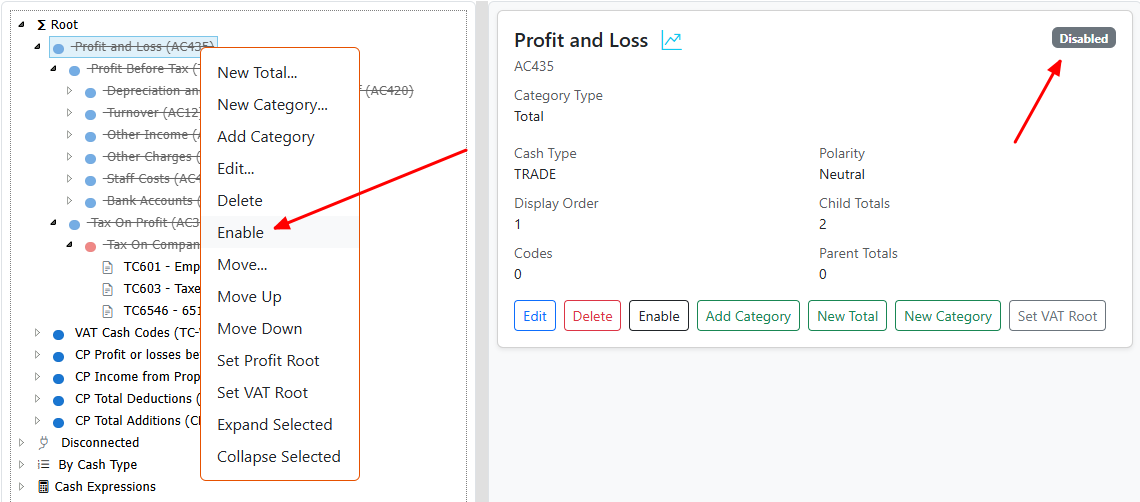
Enable/Disable toggles availability without deleting items.
-
Toggle semantics
- Categories and Codes: toggling sets
isEnabled (1/0); disabled nodes render with tc-disabled styling.
- Expressions: toggled separately with
SetExpressionEnabled and do not cascade.
- Cascade rules:
- Optional cascade to descendant categories (never codes or expressions). The UI applies category cascades only when appropriate.
-
Visual indicators
- Disabled nodes have the
tc-disabled class and a muted/badge indicator in details and menus.
- Toggle button text flips between “Enable” and “Disable” consistently across context menu, action bar, and details pane.
-
Server behavior
- Admin-only; server validates privileges and returns JSON results. UI updates immediately and refreshes top anchors as needed.
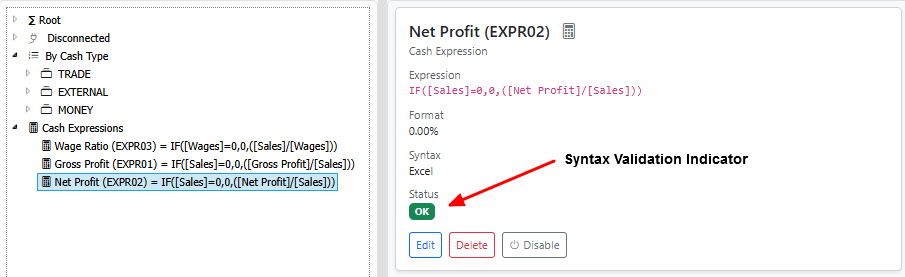
- Screenshot:
8. Expression details
Expressions compute derived values and are maintained in a flat list under __EXPRESSIONS__.
-
Data fields
expression — Excel-like formula where ranges are replaced by Category names (e.g., IF([Sales]=0,0,([Gross Profit]/[Sales]))).format — display format (e.g., 0%, currency).syntaxTypeCode — Both | Libre | Excel.isError, errorMessage — evaluation status; surfaced as badges.
-
Title formatting
- Titles longer than ~60 characters may be truncated in the tree for readability.
- Calculator icon denotes “Expression” nodes; badges show OK/Error.
-
Evaluation context
- Expressions are evaluated against the mapped Totals/Categories and export engine semantics.
- Expressions are read-only in hierarchical views and do not cascade.
-
Screenshot:
9. Mobile specifics
Mobile uses a single-pane tree with an adaptive action bar; edit and view actions navigate to full pages.
-
Long press context menu
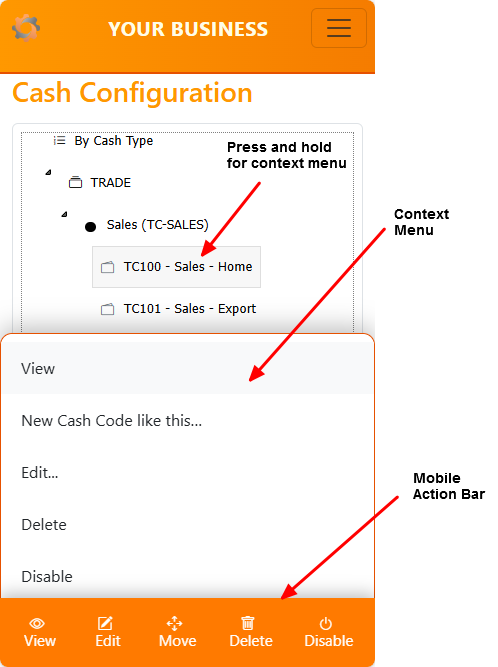
- Press and hold for 500 ms to open the context menu at the touch position.
-
Mobile action bar
- Shows context-aware buttons:
- View (always)
- Edit/Delete/Toggle (admin-only)
- Move (admin-only; hidden in Type contexts and for expressions)
- Updates automatically when selection changes.
-
Edit navigation
- Mobile navigates to dedicated pages (full Razor layout).
- Desktop embeds forms in the right pane (
embed=1), with MutationObserver detecting changes.
-
Screenshot:
10. Mutation / injection
Embedded desktop flows rely on marker-based selection and injection to avoid full-page reloads.
11. Disconnected subtree
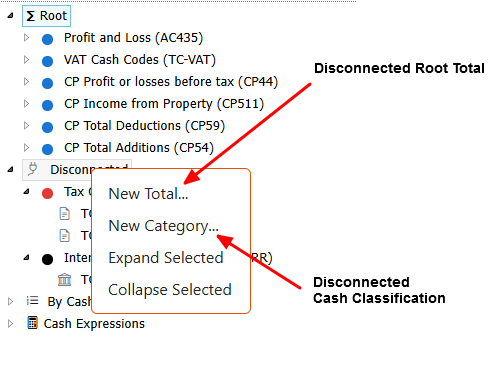
The Disconnected subtree lists categories that are not currently mapped into the primary hierarchy or any parent category.
-
Definition
- “Disconnected” is a synthetic node (
__DISCONNECTED__) that contains categories with no parent mappings.
- Expression categories are explicitly excluded; expressions only appear under
__EXPRESSIONS__.
-
Loading behavior
- Lazy loading ensures the subtree expands only when needed.
- Child items under Disconnected appear if they have Cash Codes or valid category items.
-
Usage
- Useful during setup or refactoring to find orphaned categories and attach them to Totals/Root.
- Admins can:
- Create Totals or Categories directly under Disconnected.
- Add existing categories or codes into a mapped hierarchy.
-
Screenshot:
12. Root & primary hierarchy
The primary hierarchy models Profit and VAT structures and anchors user navigation.
-
Root node
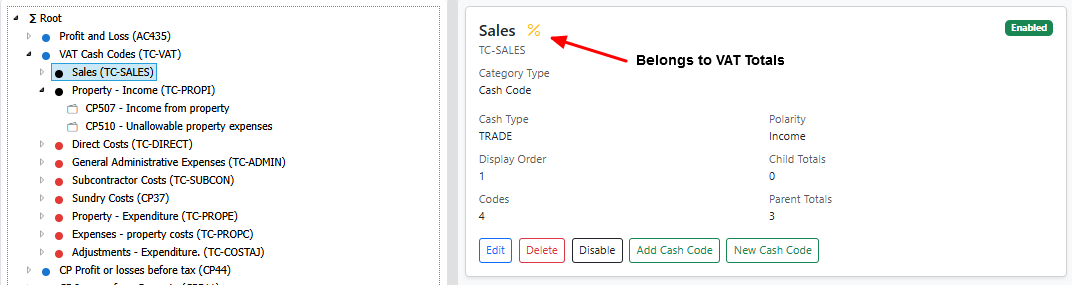
- The main anchor (
__ROOT__) shows mapped Totals and Categories.
- Icons indicate whether a category is part of Profit/VAT roots and its polarity.
-
Profit/VAT roots
- Admin-only actions “Set Profit Root” and “Set VAT Root” designate which Total category anchors those statements.
- After setting a root:
- Hierarchy glyphs and badges update.
- Current selection persists; the details pane refreshes.
- Top-level anchors (Root/Disconnected) may reload to reflect changes.
-
Display logic
- “PrimaryKind” is surfaced via icons/badges in details and tree nodes.
- Totals under Root may have additional controls (create/add/move) compared to nested contexts.
-
Screenshot:
13. Error & fallback
The UI favours smooth in-place updates, but degrades gracefully when something goes wrong.
-
Errors surfaced to users
- Inline toasts for success/info/warnings (bottom-right).
alert() for critical failures (e.g., server error, insufficient privileges).
-
Fallback navigation
- If the right-side pane is missing (desktop) or an AJAX call fails:
- The app navigates to the full page with layout and applies query-based selection on load.
-
Logging
- Server handlers use
NodeContext.ErrorLog(e) to capture exceptions.
- Common JSON responses:
{ success: false, message: "Insufficient privileges" }{ success: false, message: "Category not found" }{ success: false, message: "Server error." }
-
Retry pipeline
- Selection retries (bounded) ensure fresh-created nodes become active once the parent is visible.
14. Styling & icons
Visual cues make the tree scannable and consistent.
-
Polarity indicators
- Expense/income/neutral classes indicate cash polarity for categories and codes.
- These appear as icon styles or badges alongside titles.
-
Cash Code icon mapping
- Codes omit folder icons (leaves).
- Certain Cash Types may render distinct glyphs to differentiate trade vs money vs external contexts.
-
Expression icon
- Expressions use a calculator icon; OK/Error badges convey evaluation state.
-
Disabled styling
- The
tc-disabled class is applied to disabled nodes to mute them consistently across tree and details pane.
-
Screenshot:
15. Security / antiforgery
Razor Pages security is enforced on both client and server sides.
-
Antiforgery
- A meta tag is injected on the page:
<meta name="request-verification-token" ... />.
- AJAX requests include the
RequestVerificationToken header to protect POST handlers.
-
Roles
- Admin gating in the UI uses
Constants.AdministratorsRole.
- Server handlers validate privileges (e.g., reorders, toggles, create/edit/delete); non-admins receive JSON errors.
-
Handlers and forms
- Mutation handlers (e.g.,
ReorderType, ReorderSiblings, ReorderExpression, SetEnabled, SetExpressionEnabled, SetPrimaryRoot) require valid tokens and roles.
- Embedded forms in the right pane use standard Razor Pages antiforgery tokens and respect
embed=1 mode for layout-free rendering.
16. Persistence
The tree remembers what you had open and which item was active.
- Expanded nodes
- Stored in
localStorage under a page- and root-scoped key.
- Expanded folders are restored after refresh and lazy loads.
- Active selection
- The currently selected node key is persisted and restored where possible.
- Split layout
- Desktop left/right pane sizes persist in
localStorage (tcTreeSplit).
- Query selection pipeline
- Deep links (
select, expand, returnKey) are applied with bounded retries so newly created nodes become active once visible.
The UI is tuned to stay responsive with large hierarchies.
- Bounded breadth-first expansion
- Caps descendant loading steps (e.g.,
MAX_BFS_FOLDERS) to avoid runaway materialization.
- Throttled retries
- Selection and creation detection use small intervals and limited attempts to prevent UI stalls.
- Lazy loading
- Folders load children on demand; details pane fetches are lightweight and layout-free in embedded mode.
- Autoscroll during drag
- Tree container auto-scrolls near edges to reduce drag friction without reflow storms.
- Desktop vs mobile
- Desktop embeds forms; mobile navigates full pages to minimize heavy DOM mutations on small devices.
18. Glossary / quick reference
- Category
- A folder node representing either a Total or a Cash Code Category.
- Total
- A Category (folder) that can contain Categories/Totals; used for Profit/VAT hierarchies.
- Cash Code Category
- A Category (folder) that contains Cash Codes of the same type/polarity.
- Cash Code
- A leaf node representing a single code; includes tax type and polarity metadata.
- Expression Category / Expression
- Derived value node under
__EXPRESSIONS__; not part of category hierarchies.
- Disconnected
- Synthetic subtree containing categories not mapped into the primary hierarchy.
- Synthetic node
- Non-data anchors like
__ROOT__, __DISCONNECTED__, __EXPRESSIONS__, and type:<code> used for navigation or contextual grouping.
- Special keys
code:<CashCode>, expr:<CategoryCode>, type:<code>, __ROOT__, __DISCONNECTED__, __EXPRESSIONS__.